Flow components
Reference for the building blocks of Trust Platform flows — steps, routes, and data blocks
Every Trust Platform flow is composed of the same set of components:
- Steps which are a Start step, one or more operational steps, and at least one End step.
- Routes connect these steps, and
- Data blocks carry information between them.
This page provides a structured overview of each component type and an expandable reference of every available step, route, and data block.
Steps
Start step
Every flow begins with exactly one Start step. It is the entry point of the flow and never renders any Player UI.
Depending on what operational steps you have included in your flow, it might outline required fields you need to supply to successfuly create a session.
Additionally, you can also use it to declare which data blocks your system pre-supplies at session creation.
Operational steps
Operational steps are all steps in a flow that are not the Start or End step. They fall into two subcategories:
- Orchestrating and logic steps — control the structure of the flow without performing identity checks (conditional routing, method selection, retry handling).
- Decision-driving steps — compare or evaluate already-collected data to produce a verdict that downstream routing can act on.
Each operational step session produces exactly one route (the result), which determines:
- which data blocks are written to the flow context, and
- which transition leads to the next step or end step.
Orchestrating and logic steps
Orchestrating and logic steps control the structure of a flow — they determine how execution branches, which verification method a user takes, or whether a cancelled step can be retried. They do not produce a verdict themselves.
Overview of all available orchestrating and logic steps
| Category | Step | Description |
|---|---|---|
| Orchestrate | Conditional routing (v1) (CHOICE) | Evaluates conditions on data blocks and routes the flow to different branches. Supports AND logic, sequential evaluation, and a default fallback route. |
| Orchestrate | Method selector for verifying ID (v2) (VERIFICATION_METHOD_SELECTOR:v2) | Presents the user with a choice of identity verification methods. |
| Orchestrate | Retry prompt (v1) (RETRY_PROMPT:v1) (Preview / Alpha) | Pauses the flow after a cancelled verification session and asks the user whether to retry or abandon. Uses a rollback transition to restore the upstream step's state. |
Decision-driving steps
Decision-driving steps produce a verdict or outcome that brings the session closer to its final accepted or rejected result. Each step exposes named routes based on that verdict, which the flow uses to determine the next step.
Overview of all available decision-driving steps
| Category | Step | Description |
|---|---|---|
| Identify | Verifying ID document (IDC) (v3) (DOC_ID:v3) | End-to-end, compliant document-based identity verification (v3) |
| Identify | Verifying ID document (IDC) (v4) (DOC_ID:v4) (Preview / Alpha) | End-to-end, compliant document-based identity verification (v4), with cancellation routing |
| Identify | Verifying ID document - API only (IDC) (v1) (DOC_ID_HEADLESS:v1) | Automated verification using pre-captured document and face images |
| Identify | Verifying ID document - API only (IDC) (v2) (DOC_ID_HEADLESS:v2) (Preview / Alpha) | Headless document identity verification outputting the unified Verification data block |
| Identify | Verifying ID document (v2) (SPHINX:v2) | Agent-assisted or automated document-based identity verification via IDnow's DocIDV service |
| Identify | Verifying ID document (v3) (SPHINX:v3) (Preview / Alpha) | Agent-assisted or automated document-based identity verification, with cancellation routing |
| Identify | Verifying eID (v2) (EIDS:v2) | Authenticates users using a national electronic identity document |
| Identify | Verifying eID (France Identité) (v1) (FRANCE_IDENTITE:v1) (Deprecated) | Verifies a user's identity using the France Identité mobile app |
| Identify | Verifying eID (Personalausweis) (v1) (GERMAN_EID:v1) (Deprecated) | Verifies a user's identity using Personalausweis via AusweisApp |
| Identify | Verifying using EUDI wallet (v2) (EUDI_WALLET_VERIFIER:v2) | Verifies users using their European Digital Identity Wallet |
| Identify | Verifying UK ID (eKYC) - API only (v1) (EKYC_UK:v1) (Preview / Alpha) | Electronic Know Your Customer check against UK credit bureau and electoral roll data |
| Identify | Verifying phone number — API only (v1) (PHONE_VERIFY:v1) | Verifies that an end-user owns a given phone number by sending an SMS OTP |
| Identify | Verifying IBAN — API only (v1) (IBAN_VERIFICATION:v1) | Headless bank document verification that extracts funding source data |
| Identify | Verifying proof of address — API only (v1) (PROOF_OF_ADDRESS:v1) | Headless address document verification that extracts residential address data |
| Authenticate | Biometric enrolment (v1) (BIOMETRIC_ENROLLMENT:v1) | Registers a user's facial biometric for future authentication or verifications |
| Authenticate | Biometric verification (v1) (BIOMETRIC_VERIFICATION:v1) | Authenticates identity using facial recognition |
| Authenticate | Biometric verification (v2) (BIOMETRIC_VERIFICATION:v2) (Preview / Alpha) | Authenticates identity using facial recognition |
| Protect | AML screening (basic) (v1) (PEP_AND_SANCTIONS:v1) (Deprecated) | Screens an identity against global PEP and sanctions lists |
| Protect | AML screening (advanced) (v1) (AML_SCREENING:v1) | Identifies financial crime risks and supports real-time, risk-based AML compliance |
| Protect | Device signals (v1) (DEVICE_SIGNALS:v1) | Evaluates the trustworthiness of the user's device |
| Protect | Device signals (v2) (DEVICE_SIGNALS:v2) (Preview / Alpha) | Evaluates the trustworthiness of the customer's device and produces structured device context and risk assessment data |
| Protect | Digital signals (v1) (DIGITAL_SIGNALS:v1) | Assesses trust signals from a user's contact details |
| Protect | Digital signals (v2) (DIGITAL_SIGNALS:v2) (Preview / Alpha) | Assesses trust signals from a user's contact details and device context |
| Protect | Identity data comparison (v1) (BASIC_IDENTITY_COMPARISON:v1) | Compares identity details from two sources using step IDs configured in options. Produces a ComparisonResults data block. |
| Protect | Identity data comparison (v2) (BASIC_IDENTITY_COMPARISON:v2) (Preview / Alpha) | Compares identity details from two sources wired via inputMapping. Supports an inconclusive route for cases where comparison is not possible. |
| Trust | Signing (v1) (ELECTRONIC_SIGNATURE:v1) | Electronic signing with legally recognised assurance levels |
| Trust | Signing — API only (v1) (HEADLESS_SIGNING:v1) | Executes document signing without any user interaction |
| Trust | Signing incl. verifying ID (v2) (DOC_ID_SIGNING:v2) | Identity verification combined with qualified or contract electronic signature via document-based process |
| Trust | Signing incl. verifying ID (v3) (DOC_ID_SIGNING:v3) (Preview / Alpha) | Identity verification combined with electronic signature, with cancellation routing |
End step
Every flow must contain at least one End step. It terminates the session and declares the final outcome (accepted or rejected). A flow can have multiple End steps — for example, one for each accepted path and one for each rejected path.
Routes
A route is the path the enduser takes according to the design of the flow and the outcome/verdict of the respective step, transitioning to the next element in the flow.
Each step has one or more routes, which you can connect to the next step or to an End step.
There are two transition types:
- Forward: the default. Enduser moves towards the next element in the orchestration.
- Rollback (
type: "rollback"): redirects the enduser to a previous step - is can be the same step, or a different one.
Overview of all available routes by step
| Step | Routes | |
|---|---|---|
Session start (START) | continue | |
Verifying ID document (IDC) (v3) (DOC_ID:v3) | verified, not_verified, fraud_detected optional retry when enableRetry: true | |
Verifying ID document (IDC) (v4) (DOC_ID:v4) (Preview / Alpha) | verified, not_verified, fraud_detected, cancelled | |
Verifying ID document - API only (IDC) (v1) (DOC_ID_HEADLESS:v1) | verified, not_verified, fraud_detected | |
Verifying ID document - API only (IDC) (v2) (DOC_ID_HEADLESS:v2) (Preview / Alpha) | verified, not_verified, fraud_detected | |
Verifying ID document (v2) (SPHINX:v2) | verified, fraud_detected optional retry when enableRetry: true | |
Verifying ID document (v3) (SPHINX:v3) (Preview / Alpha) | verified, fraud_detected, cancelled | |
Verifying eID (v2) (EIDS:v2) | verified, not_verified optional retry when enableRetry: true | |
Verifying eID (France Identité) (v1) (FRANCE_IDENTITE:v1) (Deprecated) | verified, not_verified optional retry when enableRetry: true | |
Verifying eID (Personalausweis) (v1) (GERMAN_EID:v1) (Deprecated) | verified, fraud_detected optional retry when enableRetry: true | |
Verifying using EUDI wallet (v2) (EUDI_WALLET_VERIFIER:v2) | verified, not_verified optional retry when enableRetry: true | |
Verifying UK ID (eKYC) - API only (v1) (EKYC_UK:v1) (Preview / Alpha) | verified, not_verified, inconclusive | |
Biometric enrolment (v1) (BIOMETRIC_ENROLLMENT:v1) | accepted, rejected, already_enrolled | |
Biometric verification (v1) (BIOMETRIC_VERIFICATION:v1) | authenticated, failed optional retry when enableRetry: true | |
Biometric verification (v2) (BIOMETRIC_VERIFICATION:v2) (Preview / Alpha) | verified, rejected optional retry when enableRetry: true | |
Signing (v1) (ELECTRONIC_SIGNATURE:v1) | success, failure, identity_expired optional retry when enableRetry: true | |
Signing — API only (v1) (HEADLESS_SIGNING:v1) | success | |
Signing incl. verifying ID (v2) (DOC_ID_SIGNING:v2) | verified, fraud_detected optional retry when enableRetry: true | |
Signing incl. verifying ID (v3) (DOC_ID_SIGNING:v3) (Preview / Alpha) | verified, fraud_detected, cancelled | |
AML screening (basic) (v1) (PEP_AND_SANCTIONS:v1) (Deprecated) | continue | |
AML screening (advanced) (v1) (AML_SCREENING:v1) | no_match, match, inconclusive | |
Device signals (v1) (DEVICE_SIGNALS:v1) | trusted, suspicious, not_trusted, inconclusive | |
Device signals (v2) (DEVICE_SIGNALS:v2) (Preview / Alpha) | trusted, suspicious, not_trusted, inconclusive | |
Digital signals (v1) (DIGITAL_SIGNALS:v1) | trusted, suspicious, not_trusted, inconclusive | |
Digital signals (v2) (DIGITAL_SIGNALS:v2) (Preview / Alpha) | trusted, suspicious, not_trusted, inconclusive | |
Verifying phone number — API only (v1) (PHONE_VERIFY:v1) | verified, not_verified | |
Verifying IBAN — API only (v1) (IBAN_VERIFICATION:v1) | verified, not_verified, fraud_detected | |
Verifying proof of address — API only (v1) (PROOF_OF_ADDRESS:v1) | verified, not_verified, fraud_detected | |
Conditional routing (v1) (CHOICE) | Route names are defined in each choices[].then and default option | |
Method selector for verifying ID (v2) (VERIFICATION_METHOD_SELECTOR:v2) | One route per enabled verification method; optional retry when enableRetry: true | |
Retry prompt (v1) (RETRY_PROMPT:v1) (Preview / Alpha) | retry | |
Identity data comparison (v1) (BASIC_IDENTITY_COMPARISON:v1) | match, failure | |
Session end (END) | done |
Data blocks
Data blocks are the typed units of information that flow through the flow. Each step declares which data blocks it requires as input and which it produces for each route. The platform validates these dependencies before a session starts.
Data blocks are accumulated in the flow context as the session progresses. Downstream steps can read any data block produced by an upstream step. End steps use the same mechanism to control which data blocks appear in the final API responses.
Overview of all available data blocks
these blocks can also be declared as input blocks if a step requires them
As step input
Each step defines which data blocks it requires and which it produces for each verdict. Data blocks flow from each step’s outputs to the inputs of the next steps. These definitions allow the system to validate the flow, ensuring all required inputs are available before a step executes.
The data block can be included in the initial API request when a flow is executed as shown in the example below. Some data blocks might even need to be sent for Input at session create - for example when the Flow includes a step to sign documents, or phone number verification.
Overview of common input data blocks
| Type | Produced by | Description |
|---|---|---|
userReference | Required for all session creations | The subjectId supplied by the calling system |
documentsToSign | Optional, but required for session creation if the flow includes a signature step | References to documents uploaded for signing |
userContact | Optional, but required for session creation if the flow includes a phone verification step | The user's phone number in E.164 format |
The AML screening (advanced) step
- produces a
AmlScreeningResultsdata block as output. - but requires a
BasicIdentitydata block as input.
As step output
The verdict of a step determines which data blocks it produces. Many data blocks also carry the step’s verdict to indicate the outcome of the check that generated them.
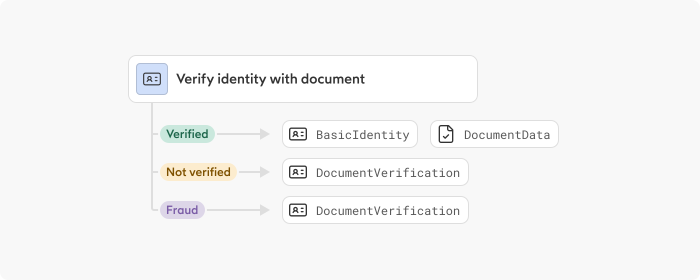
An Identity verification step generates different data blocks depending on whether the verdict is verified, not_verified, or fraud_detected.
In an identity verification flow, such as the KYC: enduser onboarding, the Verifiying eID (v2) step
- only produces
BasicIdentityandExtendedIdentitywhen the verdict of the step isverified - always produces
Verification
Missing data blocks
If a required data block is missing, the step cannot execute. As an example, an AML screening (advanced) step requires a BasicIdentity data block, which can be provided either
- in the initial API request or
- produced by an upstream step
All outputs from a step are added to the flow context, making them accessible to all of its descendant steps. As a result, any Step that generates a BasicIdentity, such as an Identity verification step, can satisfy the AML screening step's input requirement.
Input source selection
When multiple upstream steps produce data blocks of the same type, the platform uses the last produced instance by default. You can override this by configuring a step to read from a specific upstream source, ensuring the correct instance is consumed.
For example, if both the Start step and an Identity verification step produce a BasicIdentity, an AML screening (advanced) step downstream can be configured to always use the verified identity from the IDV step, regardless of what else may be available in the flow context.
This configuration is optional. Steps that do not specify a source continue to use the default behaviour (last produced instance).
Controlling the API response
End steps use the same mechanism to define which data blocks are included in the final API response. Without explicit configuration, the response contains all data blocks accumulated during the flow. With it, only the selected data blocks are returned alongside the outcome status.
OutcomeStatus is the name of the data block type that carries the final outcome of a flow (accepted or rejected). It is not a field name in the JSON response — the outcome value appears under the outcome field of the API response.
Each End step can be configured independently. For example, an "accepted" End step may return verified identity data and document results, while a "rejected" End step may return only the outcome status.
Multiple instances of the same type
Some steps require multiple instances of the same data block type as input (for example, two BasicIdentity data blocks for comparison). These steps reference two distinct upstream sources explicitly. See Identity data comparison (v1) or Identity data comparison (v2) for details.