Core concepts
Flows, steps, routes and data blocks
This page explains the core building blocks of the IDnow's Trust Platform and how they work together to form end-to-end flows:
- Flow: A sequence of steps that produces a final outcome of a flow
- Start & End Steps: Every flow has a Start step and one or more End steps. End steps define the final outcome
- Operational Steps: Execute logic such as reading inputs, writing data blocks, and producing verdicts
- Routes: Named paths that lead to another step or an End step
- Data blocks: Typed inputs or outputs of a step
To see these building blocks working together for one user, see How a verification works.
Flows
A flow defines how input data moves through a series of steps until a final outcome is produced.
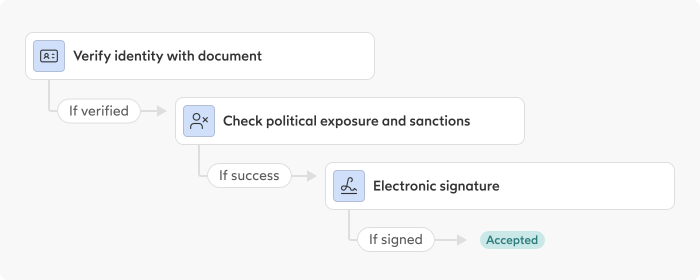
Steps
Start steps and end step
Every flow must contain exactly one Start step as its entry point and at least one End step representing a final outcome. Each session of a flow always ends in an End step, and therefore always results in a outcome that can be either accepted or rejected.
Between the Start step and the End step, you can add any combination of operational steps to perform actions, transform data and control the routing of the flow.
Operational steps
Operational steps are modular building blocks within a flow, each representing a single operational step.
Each step session results in exactly one verdict, which in turn determines:
- which data blocks are produced or updated, and
- how the flow continues via Routes to either another Step or an End step.
Routes
Each step can produce routes, which describe the result of a step operation. For example, the routes of a Document-based IDV step are:
verifiednot_verifiedfraud_detected
In the flow, the route taken determines the next step: it either leads to a follow-up step or to an End step, which sets the final outcome shown in the API response (for example, accepted or rejected).
Each step's available routes are listed in the Routes section of that step's page.
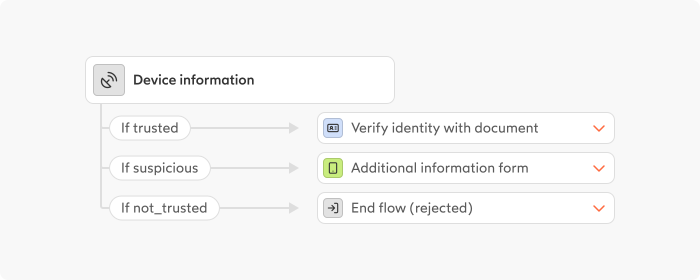
Example of an IDV Step with multiple routes, each mapped to a dedicated End Step.
Data blocks
Each step consumes and produces typed data blocks.
Examples of such data blocks could be ExtendedIdentity, DocumentVerification and DocumentData.
Data blocks keep data consistent as it moves through the flow. The platform determines which data blocks are available at each step, verifies that all required inputs are present, and ensures data dependencies are satisfied before executing a step.
The data block structure is preserved in the API response after a flow session, making it easy to trace data from the initial input to the final outcome.
Putting it together
A flow is composed of steps, verdicts, data blocks, and routes. When designing a flow:
-
Define the initial process steps For example, start with an ID verification step that outputs multiple verdicts (
verified,not_verified,fraud_detected) through corresponding routes, each connected to the appropriate next step or end step. -
Reuse outputs between Steps Data blocks produced by one step can be used as inputs to downstream steps. For instance, a
BasicIdentitydata block created during ID verification can be passed to an AML screening step, which then produces its own verdict andAmlScreeningResultsdata blocks. -
Extend the flow as needed Add additional steps for risk checks, digital signals, signatures, or evidence collection. Each step follows the same pattern of verdicts, data blocks, and routes.
By combining steps, verdicts, data blocks, and routes, you can build complex trust flows.
By understanding these building blocks, you can compose complex trust flows simply by wiring steps together. The platform handles session, data propagation, and audit trails automatically.